Best Budget Golf Simulators
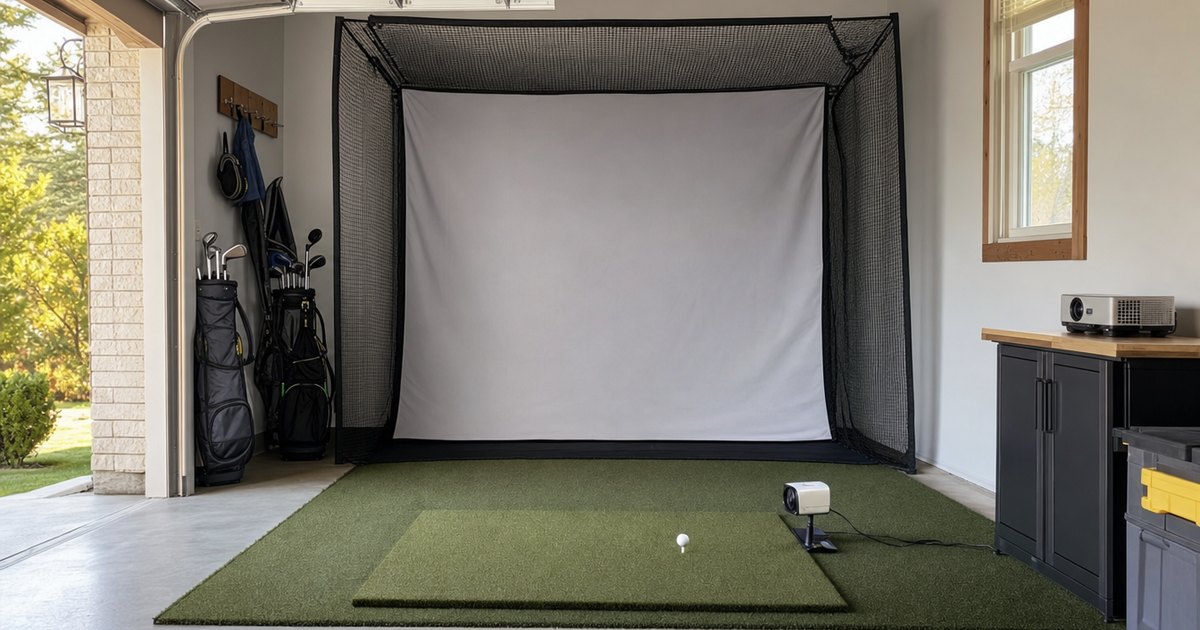
The best budget golf simulator is built around the right launch monitor, not the cheapest bundle. This guide explains the specs that decide the build — the unit at its heart, what it measures versus calculates, whether it measures spin, indoor space and ceiling height, and which sim platforms (GSPro, E6 and more) it drives — then matches them to five categories: best overall budget sim, best sub-$700 sim, best R10-based budget sim, best swing-stick / app sim (Phigolf) and best budget sim for GSPro / E6. Verified picks appear in each slot once real product data is in.
A note on how to read this. A budget sim is a stack — a monitor, sim software, a mat, a net or enclosure, and optionally a screen and projector — and there is no single best build for everyone. The monitor decides your data quality and your platform options, so it leads the decision, but your room decides what is even possible. So the value here is the framework: what each spec changes, so you can shortlist a build that fits your game and your garage. Read the framework first, then look at the picks. The one thing worth saying up front, from my own garage: ceiling height kills more builds than budget does. I nearly bought a screen my room could not swing under — measure first, then shop.
Specs and sim-software compatibility verified against manufacturer details and current retail listings — no hands-on accuracy-testing claims. "Measured vs calculated" labels reflect each manufacturer's published data method (Doppler radar / photometric camera / derived). Always confirm current sim-platform compatibility and indoor-space requirements on the manufacturer's site before buying.
How to choose a budget golf simulator
A handful of specs decide whether a budget build will actually work for you — and the first one is not on the monitor at all.
Space and ceiling height — the spec that decides everything else
Before any data spec, your room sets the limit. Spec-by-spec, a full-swing sim needs enough length for the monitor to read, enough width to swing safely, and — the build-killer — enough ceiling height to make a full driver swing without clipping anything. Most golfers want roughly 9 to 10 feet of clearance, though it depends on your height and swing. A sim you cannot physically swing under is worthless no matter how good the monitor is, which is why this is the first thing to measure. Run your room length, width and ceiling height through the sim space planner before you buy a single piece — it flags the too-low ceiling that ends so many builds.
The monitor — measured vs calculated at the heart of the build
The launch monitor is the most important and usually the most expensive part, because it sets your data quality and your platform options. Spec-by-spec, a budget monitor typically measures ball speed and launch and calculates spin from them rather than measuring it — which is fine for generating realistic sim ball flight, as long as you know the spin figure is derived rather than read. For a sim you want a unit that outputs enough measured data for the platform to render a believable round; if measured spin matters for your practice, the best launch monitors for spin page is where that becomes the priority. Either way, the monitor leads the build.
Sim platform — GSPro, E6 and what the monitor actually drives
A budget monitor is only a sim if it drives sim software, so platform support is a hard spec. Spec-by-spec, the question is whether the unit appears on the supported-hardware list for the platform you want — GSPro and E6 Connect are the popular targets, alongside The Golf Club and many units' own apps. GSPro in particular is a favourite of budget R10 builds for its courses and community. Compatibility is set by the manufacturer and changes over time, so confirm the exact platform before you buy, because a monitor that does not drive your chosen software is just an expensive range finder.
The bay — net, mat, screen and projector, in that order of need
The rest of the build is a cart-stack, and you do not need all of it at once. Spec-by-spec, the essentials are a hitting mat to protect your floor and clubs and something to stop the ball — a net at minimum. A screen and projector change how you view the round but are an upgrade, not a requirement; plenty of budget builds run the sim on a tablet or TV and add the screen later. The enclosure, mat, net and impact screen guide covers the bay in full — buy the monitor first, then build the bay around it as the budget allows.
The budget simulators compared
A short list of widely available budget sim setups, compared on the specs above. Specs and sim-software compatibility are verified against manufacturer details and current retail listings — no hands-on accuracy-testing claims, and "measured vs calculated" reflects each manufacturer's published data method.
| Best for | Tech type (radar/photometric) | Data params measured | Measures spin? | Indoor / outdoor | Sim compatibility |
|---|---|---|---|---|---|
| Best overall budget sim | Photometric (camera) | 13 metrics (ball/club speed, launch, spin, carry) | Yes | Indoor & outdoor | Swinora app (3D driving range) |
| Best sub-$700 sim | Radar (Doppler) | Club & ball speed, smash factor, tempo, distance | No | Indoor & outdoor | Garmin Golf app |
| Best swing-stick / app sim (Phigolf) | App / AI swing sensor | Swing tempo & path (no ball flight) | No | Indoor & outdoor | Golf Daddy app |
Our top picks
Best overall budget sim: Swinora Golf Launch Monitor & Simulator: Portable Swing Analyzer with 13 Metrics, 3D Driving Range, 3D Trajectory & Video Record for iOS/Android

Best overall budget sim
Swinora Golf Launch Monitor & Simulator: Portable Swing Analyzer with 13 Metrics, 3D Driving Range, 3D Trajectory & Video Record for iOS/Android
Swinora
- Tech type (radar/photometric): Photometric (camera)
- Data params measured: 13 metrics (ball/club speed, launch, spin, carry)
- Measures spin?: Yes
- Indoor / outdoor: Indoor & outdoor
- Sim compatibility: Swinora app (3D driving range)
- Price-tier: Budget
The Swinora is a portable camera-based launch monitor that reads 13 ball and club metrics and feeds a built-in 3D driving range and trajectory view. It suits beginners wanting an all-in-one budget simulator that works indoors or out with a phone or tablet.
Last checked 2026-06-15
Best sub-$700 sim: Garmin Approach G82, Portable Golf Launch Monitor and GPS Handheld with Color Touchscreen

Best sub-$700 sim
Garmin Approach G82, Portable Golf Launch Monitor and GPS Handheld with Color Touchscreen
Garmin
- Tech type (radar/photometric): Radar (Doppler)
- Data params measured: Club & ball speed, smash factor, tempo, distance
- Measures spin?: No
- Indoor / outdoor: Indoor & outdoor
- Sim compatibility: Garmin Golf app
- Price-tier: Mid (sub-$700)
The Garmin Approach G82 combines a Doppler-radar launch monitor with a full GPS course handheld and color touchscreen. It suits golfers who want shot-data practice plus on-course GPS in one sub-$700 device.
Last checked 2026-06-15
Best swing-stick / app sim (Phigolf): Golf Daddy Golf at Home Simulator – AI Swing Analyzer & No Ball Practice Trainer – Real-Time Feedback, Indoor & Outdoor Golf Practice for Skill Improvement, Portable Setup

Best swing-stick / app sim (Phigolf)
Golf Daddy Golf at Home Simulator – AI Swing Analyzer & No Ball Practice Trainer – Real-Time Feedback, Indoor & Outdoor Golf Practice for Skill Improvement, Portable Setup
Golf Daddy
- Tech type (radar/photometric): App / AI swing sensor
- Data params measured: Swing tempo & path (no ball flight)
- Measures spin?: No
- Indoor / outdoor: Indoor & outdoor
- Sim compatibility: Golf Daddy app
- Price-tier: Budget
The Golf Daddy is an at-home AI swing analyzer and no-ball practice simulator that gives real-time swing feedback through its app. It suits apartment and small-space golfers wanting a PhiGolf-style swing-stick experience on a tight budget.
Last checked 2026-06-15
Who should buy what
The golfer who wants one build that does it all — best overall budget sim
The best overall budget sim slot is for the golfer who wants the best balance of data, platform support and price in a build that grows with them. Spec-by-spec, this is the setup whose monitor measures the core ball-flight numbers reliably and drives the main sim platforms, so it plays a believable round today and accepts a screen and projector later. It is the best-rounded answer for someone who wants a real sim without overspending.
The trade-off is the usual budget caveat: the monitor calculates spin rather than measuring it, and the bay starts modest. For most golfers that is the right compromise, because the measured numbers it does capture are what you practise with, and the bay is easy to extend. If your room cannot take a full swing, none of it matters — measure first.
The tightest real budget — best sub-$700 sim
The best sub-$700 sim slot is about getting a genuine, monitor-driven sim onto your wall for the least money. Spec-by-spec, this build pairs an affordable radar monitor with a net, a mat and a tablet or TV for the view, skipping the screen and projector entirely. It still generates a real round from measured ball data — it simply does without the cinematic display.
What you give up is the projected-screen experience and some data depth. For a golfer who mainly wants to swing into a sim through the winter, that is the right trade — the round is real, the cost is low, and the screen is an upgrade you can add later. Start here and grow rather than overspending on day one.
The popular gateway build — best R10-based budget sim
The best R10-based budget sim slot is for the golfer drawn to the build that made budget home golf mainstream. Spec-by-spec, an R10-based sim centres on an affordable Doppler radar monitor that outputs ball data to GSPro, E6 and its own app, measuring ball speed and launch and calculating spin. It is the gateway build because it hits the sweet spot of price, platform support and a huge community of people running the exact same setup.
The trade-off is the calculated spin figure and a radar unit's need for enough hitting depth — so check both your room and the current platform support. For most budget builders that is a small price for the most proven, best-documented path into a home sim. It is the build to copy if you want help from a crowd that has already solved the problems.
The casual player who just wants to swing into an app — best swing-stick / app sim
The best swing-stick / app sim (Phigolf) slot suits the golfer who wants fun, space-saving practice rather than a data instrument. Spec-by-spec, a swing-stick sim uses a sensored training club and an app to estimate your swing rather than measuring full ball data, so it is the cheapest and most compact way to play virtual rounds at home. For casual play and keeping a swing grooved, that is exactly enough.
The trade-off is data: a swing-stick estimates rather than measures, so it is not the tool for dialling in carry distances or chasing a spin fault. For a golfer who wants entertainment and easy reps in almost no space, that is no loss. If real measured numbers become the goal, step up to one of the monitor-based builds above.
The platform-focused builder — best budget sim for GSPro / E6
The best budget sim for GSPro / E6 slot is for the golfer who has already decided which software they want to run. Spec-by-spec, this build leads with confirmed support for GSPro or E6 Connect, then picks the most affordable monitor that drives it well with enough measured data for realistic ball flight. When the platform is the priority, you choose the monitor to fit it rather than the other way around.
The trade-off is that committing to a platform narrows your monitor options and means watching for compatibility changes over time. For a builder who knows they want GSPro's courses or E6's experience, that focus is the point. Confirm the support is current, check your room, and build the bay around it.
What to buy alongside the sim
A simulator is a cart-stack. Around the monitor you will want a simulator enclosure, mat, net and impact screen to turn the room into a real bay. Want measured spin from the monitor itself? See best launch monitors for spin. On the tightest budget, start with launch monitors under $1,000, pick the unit with the measured-vs-calculated comparator, and check the fit with the space & ceiling-height planner before anything else.
Frequently asked questions
What is the best budget golf simulator?
Verified picks land on this page once real product data is in. The short version: a budget sim is built around an affordable launch monitor (the Garmin R10 is the popular gateway) feeding sim software, plus a mat, net or enclosure and a screen or projector. Match the monitor to what it measures and which platform it runs, then build the bay around it.
How much is a budget golf simulator?
A genuine budget home sim typically starts with an affordable launch monitor and a modest bay — net or enclosure, mat, and either a screen-and-projector or just an app on a tablet. The monitor is the part that sets your data quality; the rest is the cart-stack around it. The spread is wide because the monitor dominates the cost: a swing-stick app sim is the cheapest entry, an R10-based GSPro build sits in the middle, and adding a screen and projector pushes it up. Check the space you have before you spend, because ceiling height kills more budget builds than price does.
Can the Garmin R10 run a golf simulator?
Yes, and it is the reason "budget golf simulator" and the R10 come up together so often. Spec-by-spec, the R10 is an affordable Doppler radar unit that outputs ball data to sim platforms — its own app plus GSPro and E6 Connect among the common targets — which makes it the popular gateway into a real home sim. It measures ball speed and launch and calculates spin, so treat the spin figure as a guide; for sim ball flight that is usually fine. Confirm the exact platform you want is currently supported before you buy.
What is the cheapest way to get a golf simulator at home?
The cheapest real entry is a swing-stick or app-based sim like Phigolf, which uses a sensored training club and an app rather than a full launch monitor and screen. Spec-by-spec, it estimates your swing rather than measuring full ball data, so it is more a game-and-practice tool than a data instrument — but it gets you swinging into an app for very little. The next step up is an affordable radar monitor feeding GSPro or E6 with just a net and a tablet, before you ever add a screen and projector.
Do I need a screen and projector for a budget sim?
No — and skipping them is the single biggest budget saver. Spec-by-spec, the monitor and sim software are what generate the round; a screen and projector only change how you view it. Many budget builds run the sim on a tablet or TV and hit into a net, then add an impact screen and projector later. The view is an upgrade, not a requirement, so spend on the monitor first and add the screen when the budget allows.
How much ceiling height does a golf simulator need?
Enough to make a full swing without hitting anything — and this is the spec that ends more budget builds than price. As a rule of thumb most golfers want around 9 to 10 feet of clearance for a comfortable driver swing, though it depends on your height and swing. Spec-by-spec, measure your room length, width and ceiling height first and run them through the space planner before buying a screen or enclosure, because a sim you physically cannot swing under is the most expensive mistake on this page.
Is a budget golf simulator actually worth it?
For year-round practice and casual rounds, yes — as long as you match it to your goals and your space. A budget sim gets you swinging and playing through the off-season for a fraction of a premium room, and the data from the monitor at its heart is genuinely useful for distances and gapping. The caveats are the usual two: a budget monitor calculates spin rather than measuring it, so trust the measured numbers more, and your ceiling height has to allow a full swing before any of it matters.